Qu'est-ce que c'est ?
Jouez à pierre, papier, ciseaux avec votre micro:bit et écoutez les effets sonores des différents objets. Les élèves apprendront les notions de randomisation et de sélection dans le cadre de ce projet amusant.
Comment ça marche
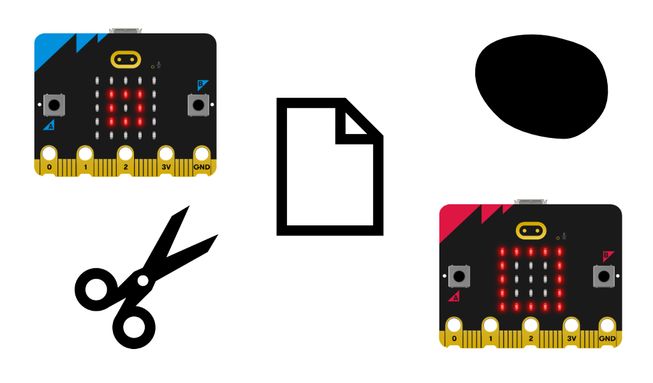
- Pierre, feuille, ciseaux est un jeu de hasard pour deux personnes. Vous et un partenaire serrez vos poings trois fois, puis faites un geste aléatoire pour représenter soit une pierre (poing), soit du papier (main à plat), soit des ciseaux (forme de ciseaux). La pierre bat les ciseaux, les ciseaux battent le papier et le papier bat la pierre.
- Ce programme permet au micro:bit de choisir pour vous entre pierre, papier ou ciseaux. Téléchargez le programme sur deux micro:bits et connectez deux blocs d'alimentation. Vous et votre partenaire devez ensuite secouer vos micro:bits pour voir apparaître deux images aléatoires, une sur chaque micro:bit.
- Vous entendrez également différents effets sonores pour le jeu de pierre, de papier et de ciseaux. Une pierre fait un bruit 'triste', une feuille de papier fait un bruit 'bonjour' et des ciseaux font un bruit 'mystérieux'.
- Le programme utilise une variable appelée ’tool’. Les variables sont des conteneurs pour stocker des données, qui peuvent être consultées et mises à jour pendant l'exécution d'un programme. La variable ’tool’ est utilisée pour stocker des nombres aléatoires.
- When the micro:bit accelerometer detects a shake movement, it sets the variable ‘tool’ to a random number: 0, 1 or 2. Le programme utilise 0 car les ordinateurs commencent à compter à 0.
- The program uses selection to decide what image to show on the LED display and what expressive sound to play.
- If the random number was 0, it shows a rock icon (a small square) and plays the ‘sad’ sound. If it was 1, it shows the icon representing paper (a square) and plays the ‘hello’ sound. Si ce n'était ni 0 ni 1, ce devait être 2 car nous avons demandé au micro:bit de ne choisir que des nombres aléatoires entre 0 et 2 ; dans ce cas, il affiche des ciseaux et émet le son 'mystérieux'.
Ce dont vous aurez besoin
- un micro:bit V2
- L'éditeur MakeCode
- coupleur de piles
Codez votre projet
Voici les blocs dont vous avez besoin pour faire le projet - il faut maintenant les mettre ensemble.
Instructions étape par étape
- Ouvrez le projet pour trouver les blocs dont vous avez besoin en utilisant les boutons ci-dessus.
- Find the pick random 0 to 2 block and put it onto the 0 in the set tool to 0 block.
- Get the set tool to pick random 0 to 2 block and put it inside the on shake block. Maintenant, lorsque vous secouez votre micro:bit, il choisira un nombre aléatoire entre 0 et 2 et le stockera dans la variable tool.
- Vous devez maintenant écrire le code relatif à la sélection. Get the if then else block and put it inside the on shake block under the set tool to pick random 0 to 2 block.
- Get the show icon small square block and put it under if tool = 0 then in the if then else block.
- Then find the play sad until done block and put it directly under the show icon small square block. Votre micro:bit affichera désormais un petit carré ou une pierre et émettra le son ‘triste‘ si le nombre aléatoire choisi est 0.
- Maintenant, trouvez le bloc show icon square et placez-le sous else if tool = 1 then dans le bloc if then else.
- Récupérez le jouer bonjour jusqu'à ce que ce soit terminé bloc et placez-le directement sous le carré d'icône d'affichage bloc. Votre micro:bit affichera un carré et émettra le son ‘hello‘ si le nombre aléatoire choisi est 1.
- Ensuite, prenez le afficher l'icône ciseaux et placez-le sous sinon dans le si alors sinon bloc. Placez le bloc jouer mystérieux jusqu'à la fin directement en dessous. Votre micro:bit affichera désormais une icône de ciseaux et émettra un son ‘mystérieux‘ lorsque le nombre aléatoire choisi sera 2.
Personnalisez-le
- Choose your own expressive sounds to play for the different objects by using the drop-down in the play sound until done blocks. Il y en a 10 au choix.
- Utilisez d'autres icônes du afficher l'icône bloc telles que la girafe, le canard, le crâne et le fantôme en utilisant l'option de menu déroulant. Inventez de nouvelles règles pour le jeu.
Exemple de projet réalisé
Jetez un coup d'œil à un extrait de code finalisé.
Projets associés
Ce projet fait partie d'une collection de projets inclusifs avec des sons et des images.