Qu'est-ce que c'est ?
Faites voler un canard d'un micro:bit à un autre et écoutez un son ’bonjour’ lorsqu'il atterrit. Ce projet vous permettra de découvrir la fonction radio du micro:bit.
Comment ça marche
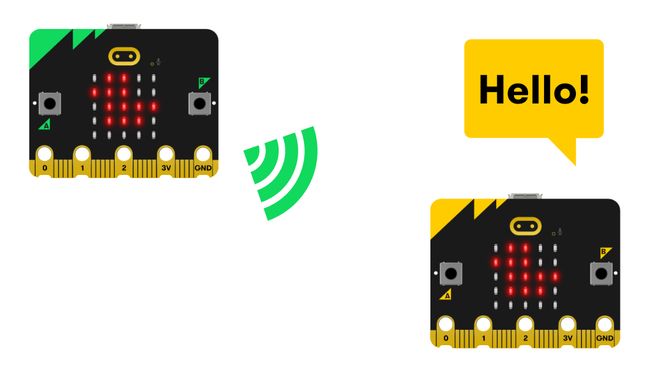
- Le programme doit être téléchargé sur deux micro:bits pour fonctionner.
- Le programme utilise la radio pour envoyer un message d'un micro:bit à un autre.
- Les deux micro:bits doivent être configurés sur le même numéro de groupe radio (qui peut être n'importe quel nombre de 0 à 255) pour pouvoir communiquer. Dans le code ci-dessous, le groupe radio est défini sur 23. Dans une classe nombreuse, les enseignants devraient attribuer à chaque binôme d'élèves un numéro unique afin que leur code n'interfère pas avec celui des autres élèves.
- Secouez votre micro:bit pour envoyer le canard de votre micro:bit à celui de votre ami. Lorsque l’accéléromètre de votre micro:bit détecte le mouvement, le programme envoie un signal radio et efface l’écran LED de votre micro:bit.
- Lorsque le micro:bit de votre ami reçoit un signal radio, il affiche un canard sur son écran LED et émet un son ‘bonjour‘.
- Votre ami peut secouer son micro:bit pour vous renvoyer le canard.
Ce dont vous aurez besoin
- un micro:bit V2
- L'éditeur MakeCode
- coupleur de piles
Codez votre projet
Voici les blocs dont vous avez besoin pour faire le projet - il faut maintenant les mettre ensemble.
Instructions étape par étape
- Ouvrez le projet pour trouver les blocs dont vous avez besoin en utilisant les boutons ci-dessus.
- Trouvez le groupe de radio 23 bloc et placez-le dans le bloc au démarrage. Remplacez le nombre 23 par un autre nombre si nécessaire.
- Trouvez le bloc effacer l'écran et placez-le à l'intérieur du bloc lorsque secouer.
- Then find the radio send string ‘DUCK’ block and put it inside the on shake block under the clear screen block.
- Find the show icon (duck) block and put it into the on radio received receivedString block.
- Find the play hello until done block and add it under the show icon (duck) block inside the on radio received receivedString block.
- Téléchargez le programme sur votre micro:bit, branchez un pack de piles et essayez-le !
Personnalisez-le
- Changez l'icône du canard dans le bloc montrer l'icône en une autre icône à l'aide de la flèche déroulante. Que peux-tu jeter d'autre à un ami ? Assurez-vous d'effectuer les modifications dans les programmes des deux micro:bits de votre groupe.
- Changez le son bonjour dans le bloc jouer bonjour jusqu'à la fin en un son différent à l'aide de la flèche déroulante. Quels autres bruits peux-tu faire ?
Exemple de projet réalisé
Jetez un coup d'œil à un extrait de code terminé.
Projets associés
Ce projet fait partie d'une collection de projets inclusifs avec des sons et des images.