Introduction
Welcome to the micro:bit user guide
This user guide provides a range of useful information related to the micro:bit. For example, how to transfer code to the micro:bit or reset it, and details of our official code editors and tools including Microsoft MakeCode, the micro:bit Python Editor, micro:bit classroom and our mobile apps.
Other useful links
In addition to the user guide, the following sections also provide information you may find useful:
Understand the basics of why teachers love the micro:bit and what it can do.
Understand the basics of why teachers love the micro:bit and what it can do.
If you are a first time user with a new or used micro:bit, this is the place to start.
If you are a first time user with a new or used micro:bit, this is the place to start.
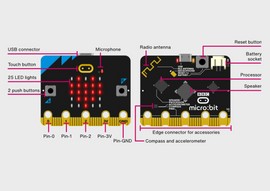
Explore the features on the micro:bit through videos and project suggestions.
Explore the features on the micro:bit through videos and project suggestions.

Discover our free resources available to support teaching with the micro:bit.
Discover our free resources available to support teaching with the micro:bit.

Get coding with MakeCode blocks, Python, CreateAI and Scratch
Get coding with MakeCode blocks, Python, CreateAI and Scratch

Find out how to easily share and save code with a whole class.
Find out how to easily share and save code with a whole class.
Accessibility
Our guides and resources are designed to help teachers support students with different needs when using the micro:bit.
Support
Get answers to your questions via our knowledge base articles or contact our support team.
Developer site
Find details of the micro:bit’s hardware, software and firmware and other support suitable for those developing with or for the micro:bit.