Overview
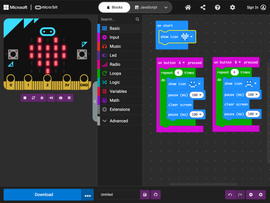
The Microsoft MakeCode editor for micro:bit is designed and maintained by Microsoft in partnership with the Micro:bit Educational Foundation. It includes features that promote greater accessibility for everyone.
These features include:
- Keyboard controls
- Immersive reader (for example for tutorial content)
- Zoom, responsive layout options and themes (including dark mode)
- Screen reader support (new in 2026)
You can find details of these accessibility features at:
Find out more about keyboard navigation, screen reader support, and visual accessibility:
Other resources
These teacher guides outline common barriers and provide concrete suggestions.


Getting involved
How can I provide feedback?
Please send your thoughts, ideas, and comments to us at accessibility@microbit.org. We welcome feedback on improvements that could be made to the keyboard controls or suggestions for additional resources that would help students to learn how to use the keyboard controls.
To get involved with the Foundation's latest user research activities, including work to improve accessibility, join our research community where the current focus is on accessibility.