What is it?
Play rock, paper, scissors with your micro:bit and hear sound effects for the different objects. Students will learn about randomisation and selection making this fun project.
How it works
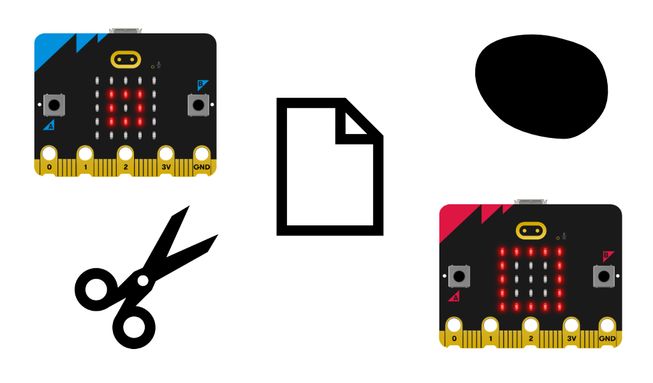
- Rock, paper, scissors is a game of chance for two people. You and a partner shake your fists three times and then make a random gesture to show either a rock (fist), paper (flat hand) or scissors (scissor shape). Rock beats scissors, scissors beat paper, and paper beats rock.
- This program allows the micro:bit to choose either rock, paper or scissors for you. Download the program onto two micro:bits and attach two battery packs. You and your partner should then shake your micro:bits to see two random images appear, one on each micro:bit.
- You will also hear different sound effects for rock, paper and scissors. A rock makes a 'sad' sound, paper makes a 'hello' sound, and scissors makes a 'mysterious' sound.
- The program uses a variable called ‘tool’. Variables are containers for storing data, which can be accessed and updated while a program is running. The variable ‘tool’ is used to store random numbers.
- When the micro:bit accelerometer detects a shake movement, it sets the variable ‘tool’ to a random number: 0, 1 or 2. The program uses 0 because computers start counting at 0.
- The program uses selection to decide what image to show on the LED display and what expressive sound to play.
- If the random number was 0, it shows a rock icon (a small square) and plays the ‘sad’ sound. If it was 1, it shows the icon representing paper (a square) and plays the ‘hello’ sound. If it wasn’t 0 or 1, it must be 2 because we instructed the micro:bit to only pick random numbers between 0 and 2, so in that case it shows scissors and plays the 'mysterious' sound.
What you need
- a V2 micro:bit
- MakeCode editor
- battery pack
Code your project
Here are the blocks you need to make the project - now put them together.
Step-by-step instructions
- Open the project to find the blocks you need using the buttons above.
- Find the pick random 0 to 2 block and put it onto the 0 in the set tool to 0 block.
- Get the set tool to pick random 0 to 2 block and put it inside the on shake block. Now when you shake your micro:bit, it will pick a random number between 0 and 2 and store it in the tool variable.
- Now you need to write the code that relates to selection. Get the if then else block and put it inside the on shake block under the set tool to pick random 0 to 2 block.
- Get the show icon small square block and put it under if tool = 0 then in the if then else block.
- Then find the play sad until done block and put it directly under the show icon small square block. Now your micro:bit will show a small square or rock and play the ‘sad’ sound if the random number chosen is 0.
- Now find the show icon square block and put it under else if tool = 1 then in the if then else block.
- Get the play hello until done block and put it directly underneath the show icon square block. Now your micro:bit will show a square and play the ‘hello’ sound if the random number chosen is 1.
- Next get the show icon scissors block and put it under else in the if then else block. Put the play mysterious until done block directly underneath that. Now your micro:bit will show a scissors icon and play a ‘mysterious’ sound when the random number chosen is 2.
Make it your own
- Choose your own expressive sounds to play for the different objects by using the drop-down in the play sound until done blocks. There are 10 to choose from.
- Use other icons from the show icon block such as the giraffe, duck, skull and ghost by using the drop-down option. Invent new rules for the game.
Example of a completed project
Take a peek at some completed code.
Related projects
This project is part of a collection of inclusive projects for students with visual impairments.